default

2014-05-15 RGB Full Multicolor Flashing LEDs

I ordered these from an Amazon seller, Liroyal-led, a few weeks ago in April.  It took that long to ship from Hong Kong.  They are 50 pcs of Bluecell 5mm RGB full multicolor flashing LEDs.  The cost was $3.45 including free shipping.

The case is clear epoxy.  I looked down inside and saw four chips wired together.  Three of these are the LEDs and then there’s the 4th chip, which is much larger then the LEDs.  I  can see fine patterns on the chip so it may be a microcontroller.  It flashes the LEDs at first a slow and then a fast pattern.  The colors change during each fast or slow period.

To test one out, I connected one to a power supply. It began to flash as I described above. But the voltage was critical. If I increased it slightly the current increased a lot, which indicated to me that these LEDs need a current limiting resistor in series, to prevent the current from becoming excessive.

I connected the LED to a Joule Thief. Because the JT output was pulsating, the LED put out all three colors and did not flash. I connected a 1N4148 Diode and 47uF capacitor to the output, to rectify and filter out the pulses. The LED was directly across the capacitor. The LED began blinking as it was supposed to, and changed colors. The JT supply current varied between 75 to 80 milliamps, which is about normal.

These LEDs add an interesting effect, but require DC to work properly. I think the best way to use them is to put a 100 ohm resistor in series and connect them to a 5 volt DC source, such as a USB charger. An old USB plug will allow them to be plugged into any 5V power source. But use only the Red and Black wires.

default

2014-05-04 UV LED Flashlight

I bought some ultraviolet flashlights for about $5 apiece from Goldmine Electronics.  These are the same as the standard 9 white LED flashlights that are found in the bargain stores except for one additional feature which is and on off switch next to the head.  Normally the on/off switch is on the rear of the end cap.  The body of the flashlight is made out of hard rubber.  I have found that this rubber turns to a gooey substance after a year or two, which makes it really unpleasant to use.  The flashlights came with three AAA batteries included. I could not find any brand name on them, other than they were made in China.

But it does put out a pretty bright UV light.  The light pattern is about the same as a white LED flashlight. The UV LEDs that I have used previously had a purple or violet color. These flashlights have a bluish color. But it definitely has UV coming out; shine it at any bleached paper and the paper lights up brightly. I tried it on a few different dollar bills, tens and twenties but they all looked dull to me. I guess if they’re counterfeit then they light up brightly.

The price is reasonable but I wouldn’t recommend these to anyone if they want to keep it for more than a year because the case is going to turn into a gooey mess. If their outside can be covered up with tape or sprayed with paint then they might last longer.

default

2014-04-26 DIY AA Cell Holder

I made another battery holder just a block of wood with a screw to tighten against the AA cell.  This screw tightens up against the negative end.  The positive end just rests against the wood.  I plan on putting the wire between the wood and the positive and tightening the screw to hold it there .  I’ll clip an alligator clip of the negative lead on the screw threads.

The question “why not just use a battery holder from the store?” comes up, and there are 2 answers. The battery holders from the store are so cheap that between the springs, the rivets and the thin wires, the I2R (I squared R) losses add up to an excessive amount. I took a brand new single AA cell holder out of the package and tested it with my ohmmeter. I put a short alligator clip between the spring and the other contact and measured the resistance at the ends of positive and negative leads. My very accurate ohmmeter measured between .195 and .21 ohms. At 1/2 amp current, that’s one tenth of a Volt, or about 7 percent of the one and a half volts of the battery lost and wasted in the holder.

I thought I had solved this problem by using 2 button magnets. These neodymium magnets are very strong and make good contact with the AA cell. Well, they make good contact as long as the cell is made out of iron or steel. But I’ve been buying packages of cheap batteries that have contacts made of a nonferrous metal such as brass, so the magnet won’t stick to the contact.

So there are the two answers for why I am building my own battery holder. Here’s another.

I’ve been making my own battery holders because the ones from Radio Shack are so lousy quality that the first time the battery leaks, which inevitably happens when the JT drains them completely dry, then the spring and contacts rust and the battery holder makes poor contact. Of course that might be a good idea if you want your JT to look like a candle flickering.

Building it myself also gives me the opportunity to use up some old terminal strips and contacts. One that I use occasionally is the Fahnestock clip. This spring clip holds one or two wires. It’s available from Mouser.com.

For the body of the battery holder I used a piece of soft pine wood. I drilled a few holes in a rough pattern of the AA cell. I used a small chisel to cut out most of the wood. Then I used a Dremel mototool to cut out the remaining wood so that it looked somewhat like the battery. I used the chisel and mototool to cut out the wood until the battery fit. After this I drilled a hole in the end for the screw.

I used a number 8 by 2 inch sheet metal screw. I filed down the sharp end so that it would hit the battery with a flat area, not a point. I screwed the screw into the wood to put threads in the hole, and then removed it. I dipped the wood in clear polyurethane and let it dry. While it was drying I found a large nut and soldered it to the head of the screw so that acts like a knob. After it dried I screwed the screw into the wood and put a battery in the hole, and tightened the screw. It held the battery securely. The polyurethane made the wood hard enough so that I could put a wire between the wood and the battery and tighten the screw and the wire wouldn’t sink into the wood too much. It works good enough to skip putting a contact on that end (I had planned to).

default

2014-04-17 Not A Printed Circuit Board

I have thought about this a few times in the past.  It may be more environmentally friendly than using copper or other metals for a circuit board. I have some small scraps of wood that I think would make a good circuit board for a project.  Some Hams (amateur radio operators) have used the Manhattan style of building projects.  This method uses regular circuit board with dots cut out of copper as the pads.  Instead I thought that I could use small brass screws as the pads on the block of wood.  I have used brass escutcheon pins, which are small nails as terminals on a block of wood and they work OK.  I also thought about using a a dremel mototool with a small router bit and just cutting holes in the wood for the parts with grooves between the parts for the leads.  This has to be done manually unless some kind of an X-Y milling machine is used.  I see no problem with that because wood is relatively inexpensive.  But the wood is not a very good insulator and could cause problems with high impedance circuits.  In that case it would be better to use plastic or Nylon, which is still not expensive.  Also if the quantity of circuit boards is large enough, then a molding machine could be used to make the plastic parts.  The circuit board could then be integrated into the project case.

I have also thought about how to connect the leads.  If the circuit board is insulated then a small hole could be added where the leads come together and then the leads can be connected with a conductive material such as a metal plated plastic pin or a carbon filled conductive rubber plug.  Two or more leads would be stuck into a small hole and the rubber plug would connect them together.  This is the opposite of using a metal eyelet with an insulated rubber plug but it accomplishes the same thing.

Another thing I like about this is that some parts such as transistors have a case that is made to be placed by automated assemblers.  The hole for the transistor could be shaped so that the transistor can only be inserted one way.  This would be very helpful for a kit to be assembled by the user.  Obviously the parts would not be surface mount, they would have to be thru hole parts.

Another way to do this is to use a 3D printer. The circuit would be built up instead of cut out of plastic. This would be good for the prototypes and then later changed to a cheaper form of construction, such as molding.

I’ve read that people scan in a part with a 3D scanner and then use software such as SolidWorks to modify the design if needed. This will allow me to build a prototype out of wood and after it’s correct then scan it in and have it made out of plastic using a 3D printer for a prototype.

At Santa Ana College where I used to work they offer CAD/CAM classes where one can learn how to design a part and then actually make it on the milling machine. With a regular copper circuit board, I could put a small router bit into the milling machine and actually cut out the copper on the board leaving the traces and holes for the parts. But it would be easier just to print the circuit out and etch it, or send the design to a circuit board manufacturing company.

All this doesn’t sound very efficient but then when you build a prototype you’re not really too concerned about the cost if there are going to be thousands more made later. I’ve thought about the kinds of circuits that would work well with this assembly method and the best choice might be simple small circuits that would be put into a kit, that do not have to be very small. One good thing is that this assembly method eliminates soldering. Of course, it might be possible to program an automated machine to do the assembly. Some of the things I’ve talked about have or may have been used by kit makers. I would welcome a comment about any pro’s and con’s about this.

default

2014-04-16 Kruithof Curve

Paul sent me a link to a Wikipedia article, http://en.m.wikipedia.org/wiki/Kruithof_curve which is new to me.  I was introduced to some other illumination terms such as correlated color temperature by the website donklipstein.com which has a wealth of info on lighting and LED lights.

Before CFL and LED lights, we were using incandescent lights which have a color temperature that is limited by the temperature of the tungsten filament.  The manufacturer of the light determines what this temperature is by setting the amount of resistance of the filament so that the light has a reasonable lifetime and puts out enough light.  The manufacturer could do little to change the color temperature of the light.  All that has changed now that CFL and LED lights are being sold.  These lights use phosphor to supply the light, and the phosphor can be changed to change the light’s color temperature.  This change is just a matter of changing the chemicals used for the phosphor.  With CFL and LED lights you can buy soft white which is similar to incandescent lights and you can buy bright white or daylight which is similar to sunlight. There may be other colors, but generally they are not seen in stores.

These changes to lighting have brought these physical lighting terms such as correlated color temperature and Kruithof Curves out of the language of specialists, and into more general use. But it may be a few years before the lighting industry gets to develop and use them in lighting design; at this time it seems the lighting industry is more oriented towards duplicating the incandescent light and saving a lot of energy.

There is a TV series now being shown on PBS, called Your Inner Fish. Episode 2 of the series is called Your Inner Reptile. They discussed the mammals that were in existence around 65 million years ago before the dinosaurs became extinct. These were small furry creatures that were nocturnal, they slept in their burrows during the day and came out at night to forage for food. After the dinosaurs became extinct the mammals started to come out during the daytime, but today we still retain some of those reptilian and early mammal characteristics in our genes. It seems to me that this may be why we like to sit around a campfire at night and enjoy its warm glow, and tell spooky stories. It may also explain why we like the warm white glow of candles and incandescent lights. There are many creatures out there in the forest that are just waiting to take a bite out of you, so keep the fire lit all night long, or they might actually bite you! :-O

default

2014-04-13 Samsung Galaxy S4 Problems

For the last month or so GS 4 has been a bit of a problem.  First started requiring charging twice a day.  I was thinking that it was because I used it a lot more.  That may be one reason but I think now that its about 8 months old the battery is losing a little bit  of its capacity, so it runs down quicker.

Then I started having a few problems in the editor and then other things due to the weirdness of the keyboard when I’m typing.  I would get an occasional crash when it would tell me that it stopped working.  I decided that it would be a good idea to power off and then wait a moment and power it back on.  I thought it would help, but it helped very little or not at all.  It was very frustrating when the cursor would disappear and reappear somewhere else in a text I was editing.  Other things were strange too, like the phone. 

My friend said he went online and bought a battery for really cheap for his Samsung, so I decided I would do the same thing.  I pulled the case open and removed the battery to find out what the part number was.  I put the battery back in and closed up the case in powered it back on and everything was okay.  I now it itching editing this blog and I’m no longer having the weird keyboard problems.  I hope that the other problems I was having were reduced or eliminated by the battery removal.  Also I was talking to some people the other day and they say they have iPhones.  They also removed the battery in their iPhones and it seemed to help.  Apparently turning off the power in a mobile phone doesn’t seem to clear the memory enough to remove some problems.  Only removing the battery actually clears the memory.

After this I ordered some batteries online for very cheap.  Samsung replacement battery only cost about $11 with free shipping but it shipped from Hong Kong and that will take 2 or 3 weeks.  I can live with having to recharge every 8 or 10 hours for another couple weeks, no problem. Another thing I bought overseas was up combination battery charger and two spare batteries.  These are not Samsung, they are substitutes.  But two batteries and a charger were about the same price as the Samsung battery – $11.00 with free shipping. They are 2800 mAh, slightly more than the Samsung’s 2600.  In any case I will have a spare battery to take along in case I’m running low on charge.

I’ve been using the new battery in the Galaxy S4 for a few days now and it’s working much better after I removed the battery. I went to lunch today with coworker and he just bought the Galaxy Note 3. He has had more than one iPhone in the past few years so I found it kind of odd that he switched. But he’s so much happier with the much larger screen. And the price is a lot less than the iPhone – I think he said he paid $300 for it. I think that I’ll be getting a Galaxy Note 3 ( or whatever the next generation is) next time I buy a new phone.

I’ve been reading about how Apple and Samsung are constantly battling in court over patents for their cell phones. The only ones who make money out of these billion dollar lawsuits are the lawyers, better known as land sharks. The real victims seem to be the users of their products. It seems so stupid; why don’t they just cross license each other’s patents?

default

2014-04-09 Nichia 3.3W, 225 Lm LEDs And Night Joule Thief PC Board

I left the Nichia LED on the power supply overnight, at about 85 to 90 mA, and it didn’t seem to have any problem.  I decided that I had to design a circuit to drive it from a low voltage, such as two AA rechargeable cells.  I drew up a circuit, which had two transistors for mainly one reason: the output voltage must be more than 20 volts in order to drive this LED.  Using two transistors makes the circuit oscillate without having a second feedback winding on the coil.  So all that’s needed is a choke or inductor.

Well, I was thinking, why should I build a circuit when I have several of the Night Joule Thief boards from The LED Artist, Akimitsu Sadoi.  All I have to do is modify one to get it to handle more voltage, current and power. I found the schematic by using Google to search for night joule thief.  Its the first schematic that ‘s in the images.  More info about it can be found on Instructables.

The output transistor is going to have to handle quite a bit of current, about a half amp or more.  It will also have to withstand more than 20 volts peak.  I thought that the BD135 would be a good choice, and should run cool enough to not need a heat sink.

1 deficiency of this circuit is that the output transistor is driven bye an NPN transistor. This means that all of the current that turns on the output transistor has to be supplied by the resistor to the collector of the driver transistor. So this resistor has to be very low and it wastes some power. If a PNP transistor was used to drive the output transistor then all of the current is supplied through the PNP transistor and the resistor from its collector to negative can be much higher and waste less power. The PNP transistor can supply much higher current than the resistor, and also turn on the output transistor much better.

I already had a Night JT PC board partly assembled so I used it.  I swapped out the transistor and put leads on the BD135 to make them fit into the holes.  The BD1135 leads were too thick to fit by themselves.  I removed the inductor and used a 56 μH inductor used for high current.  It’s surface mount with a ferrite bobbin surrounded with a square body of ferrite and has an air gap between the two.  It’s very low DC resistance, only 0.35 ohm, and can handle 0.75 amp. I had to add two short leads to it for the holes in the circuit board.

I used the following values for the following parts:

  • CdS photocell = omitted (for now)
  • C1 = 1000 pF Ceramic Disk
  • Vr1 = replaced with a 33k fixed resistor.
  • R1 = 2.2k
  • R2 = 220 ohms
  • R3 = 10 k
  • Q1 = BC327-25
  • Q2 = PN2222A
  • Q3 = BD135
  • D2 = replaced with a 1 ohm resistor for measuring the LED current
  • D1 = Nichia NS6W183  3.3W, 225 Lumen, 73 Cd, 20V, 115 mA,
  • 6 chip White LED, goldmine-elec.com #G19461A

At first I used the original values for R1 and R2 but the LED current, even at 3V, was too low.  So I then replaced them with the values given in the parts list above.  The LED current went up to about 19 mA at 2.5V and 27 mA at 3V.  At 1.5V the LED current was only about 4 mA – it was clear that this circuit has to be powered by 2.5 or more volts.  The supply current at 2.5V was about 250 mA and at 3.0V it was over 400 mA.  A pair of AA rechargeables is not going to last long at that current.

The LED is reasonably bright, but even 27 mA is less than 1/4 of its maximum current of 115 mA.  So I have to do some more experimenting to optimize the circuit and increase the LED current.  The BD135 gets warm, but not hot – it’s running well within its limits without a heat sink.  The frequency is below 100 kHz, around 91 or so depending on the voltage.

Update Apr 10
I pulled out the 1000 picofarad capacitor and replaced it with a 680 pF and a variable capacitor. When I tuned the variable I got a very broad peak at 920 picofarads. So 1000 picofarads is just about right, and I put it back in.

I still wasn’t satisfied with 27 milliamps through the LED. I connected another resistor across the 220 ohm R1. The LED current jumped up to 32 milliamps. I measured the two resistors and got 110 ohms, so I removed the 2 resistors and replaced them with a 110 ohm resistor. Now I was getting 5 more milliamps, for a total of 32. Better, but still only about a third of the way. The supply current was 430 mA at 2.5V. Two AA rechargeable cells should last for about 4 hours. If it drew more current the battery lifetime will be even lower, so I think this is a good compromise.

Efficiency
The input power is 2.5V times .43Amps, or 1.075 watts. Output power is 19 V times .032 Amps, or .608 watts. The efficiency is .608 / 1.075 or 56.6 percent. Not all that great but a little bit better than the typical joule thief

default

2014-04-08 Philips Lollipop LED Lights

I received my order of four LED lights made by Philips yesterday.  They’re called SlimStyle, but they look like lollipops.  It’s 2700 K warm white, 800 lumens and 10.5 watts. The model # is 9290002707. It’s also known as Philips 433227, but I don’t see that on the package.

I screwed it into a lamp and turned it on and it looks pretty good.  The bulb has printing on it that says that it’s not supposed to be used in an enclosed fixture.  I think that’s because it doesn’t have a heatsink in the base like most LED lights do.  I will probably use them inside where they will stay relatively cool.

I stopped by Home Depot yesterday and these lollipop lights are now on the shelf. They weren’t there a week ago when I ordered them last week. They are not selling like hotcakes; I guess people don’t realize that spending $10 on a lightbulb can save them hundreds of dollars in the future. As soon as they buy the light bulb the sooner they start saving money. Instead they go by 4 packs of incandescent lights for a few dollars and waste several more dollars on electricity. That’s why they banned the sale of incandescent light bulbs. I talked to a guy I know who owns a restaurant. He had 55 of the PAR flood lights in his ceiling connected to dimmer switches. Last year I told him that if he replaced the lights with LED lights, he would save a lot of money. He tried some LED lights but they wouldn’t dim on his dimmer switches. The the Electric Company representatives came and replaced the lights with LED lights that work with the dimmer switch. He said he now saves $150 a month on his electric bill. I also said that because there’s less heat in the room he will save even more money and when it gets warm and the air conditioner starts to be on more.  The restaurant is open 12 hours a day, 6 days a week, and even though it has skylights, the lights are on most of the time.  So at $10 a lightbulb X 55 bulbs is $550. He’s already saved about half that and in a couple more months he’ll save the whole cost. Even if he had spent $20 a lightbulb a year or so ago, by now he would have saved more than the 1100 dollars it would have cost. The sooner you start using LED lights the sooner you start saving money and they pay for themselves quicker.  Such a deal!

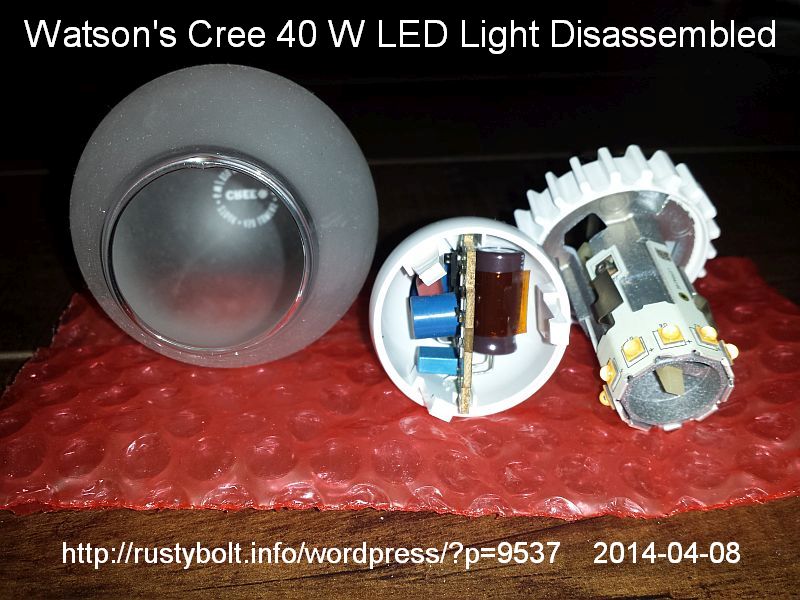
Here is a write-up in a blog about the Cree LED lights. They take a few apart to see how they are made. http://www.designingwithleds.com/inside-cree-led-bulb-family/

Yesterday I took a non-working 40 watt Cree LED lamp apart to see if it was the same as the ones in this blog.  The globe is attached with glue that will come loose, but be careful.  Even though the glass is coated with plastic, it could break.  IMG_20140413_052022S3Mine is a 40 watt equivalent. It looks almost the same as the ones in the blog.

Unfortunately the light has contacts that are spring loaded so that the parts can be snapped together. Once the lamp is assembled the contacts don’t move and over time I think the heat and oxidation cause the contacts to become intermittent. The light flickers every once in awhile, but not enough to be annoying. However the intermittent contact allows the power supply to lose its load for a very short time and then the voltages can climb to the extreme and that’s hard on the parts.  Eventually the parts fail due to the stress. I think that’s what happened to this Cree lamp.

Here is an interesting website that deals with the electrical grid. http://fnetpublic.utk.edu

default

2014-04-06 Backing Up PCs

Yesterday I helped a friend backup his free laptops to an external hard drive.  We had several problems.  One problem was that the DVD drive didn’t seem to work right on One Laptop.  I think a reason might be that the DVD Drive is seldom used and it builds up dirt and dust and that interferes with the operation.  But since it’s a laptop, the inability to take it out easily prevents me doing any maintenance on it easily, or even replacing it.

If this was a desktop PC, I would open it up and unplug the DVD and plug a spare DVD in temporarily to finish the backup. That can’t be done easily on a laptop.

One of the laptops has Windows 8 on it.  I did a backup using Ghost32 11.5, and the hard disk image was only 12.5 GB, which I know from experience is much too small.  It should be at least 40 or maybe 70 or 80GB depending on how much software is installed.  My guess is that Ghost doesn’t recognize the Windows 8 type of file system on the hard disk. I’m going to have to do some more investigating to find out if this is true.

Tags: , ,
default

2014-04-04 Nichia 225 LM LEDs


I received  box in the mail yesterday and opened it up to find a small plastic bag with the LEDs in it. The bag took up less than 1 tenth of the space inside and the rest was wadded up paper.  Each LED is in a cup in the plastic tape, and covered with clear plastic film, which peels off to allow the LED to be picked up by the automated machine that puts it on the circuit board.   In other words this is a surface mount LED. According to goldmine-elec.com, these are new Nichia NS6W183RT 6 chip SMD white LEDs, 5 mm square by 1.35 mm high. Their brightness is 225 Lumen, 73 CD, 3.3 watt, and require 21 volts at 115 milliamps.

It looks like one contact is the heatsink for the LED chip, so it should make good thermal contact with the circuit board. How am I going to mount this temporarily so that it makes good thermal contact with the mount? If it’s going to put out a lot of light it’s going to need a good heat sink. I was thinking of using a heavy copper wire as the mount. Or maybe an old copper penny? I have enough LED’s so I can experiment a little bit, so I guess that’s what I’ll have to do.

The LED has no lens, it’s just flat on its surface so the light output is over a wide area, probably close to 180 degrees. It will make a good task light over a table or something like that. But if I want to use it for a flashlight or something similar, it’s going to need a reflector. I have a lot of old flashlights with incandescent bulbs so I could try putting the LED into one of those reflectors. The problem is that those reflectors were made for incandescent bulbs, not for LEDs, and the reflector doesn’t do a good job; much of the LED’s light is spread out and doesn’t get concentrated into the beam. So the flashlight is going to look more like a flood light than a flashlight.

I heated up my soldering iron and found a piece of 12 gauge wire about 6-1/2 inches long. I took a utility knife and stripped off the insulation, then bent it in half like a hairpin and with a pliers, made the bend very sharp. Then I bent the sharp bend 90 degrees to the wires so the wires will face to the rear of the LED.

I used a forceps to hold the LED but it sprang loose and flew into some boxes on the shelves and I gave up trying to find it after about 20 minutes. I had better luck with the second one; I managed to get it soldered onto the heavy wire. But when I was soldering the other contact on, it pulled loose – I now had two LED pieces – so I found out these LEDs are very delicate. I put a rubber band on the end of a long nose pliers to hold it closed and better grip the LED. I repeated this sequence again: the 3rd led flew off into the boxes and I took a quick look and gave up. I managed to get the 4th led soldered to the heavy wire but then it broke off when I soldered the other lead on. Man, these things are really delicate! Finally I got the fifth LED on the heat sink and the other wire soldered up to it. Only one out of five! I’m really glad I bought plenty of these things!

I clipped the power supply leads and turned the power supply on and started turning up the voltage. I got to 16, 17, 18 volts and it started glowing, then got brighter. The milliammeter started to approach 50 then100 milliamps at 19.4 volts. That’s almost 2 watts. The bright white light was blinding; it lit up the bench nicely. The heavy copper wires got so warm near the LED that it stung. They were warm at the far end, so they’re doing their job.

Whew! Success! I think it’s time for a break! It’s apparent that these LEDs were made to be mounted on a single piece of PC board that puts no tension on the two contacts. I strongly urge anyone to use a similar mounting method, or you’ll get the same bad results that I got. I’m going to try a piece of PC board with a large area of copper, double sided. I may try to mount this PC board on an aluminum heatsink.

More hopefully good results later.

© RustyBolt.Info/wordpress
CyberChimps